Showing posts with label 11g New Features. Show all posts
Showing posts with label 11g New Features. Show all posts
Saturday, October 27, 2007
Oracle 11g for Windows is available for download
Dear all,
Most awaited Windows release of Oracle 11g is now available for download. You may download it from here:
http://www.oracle.com/technology/software/products/database/index.html
Wishing you all a happy download!!
Regards


Monday, October 01, 2007
"1Z1-050: Oracle Database 11g New Features" Beta Exam declared
Oracle University has announced beta exam of "Oracle Database 11g New Features". As usual, the price of this beta exam is also $50.
Well, beta exams are really time consuming and this one is for more than 3 hours (190 minutes). So, get your coffee ready before proceeding to the exam.
More information can be obtained from the below URL:
http://education.oracle.com/pls/web_prod-plq-dad/db_pages.getpage?page_id=41&p_exam_id=1Z0_050
Note: 30 November, 2007 is the Exam Close date. Hurry ....
My best wishes for all beta exam takers !!!
Monday, September 24, 2007
Use of Oracle Sequences in PL/SQL Expressions
In this post, I will be discussing yet another new feature of Oracle database 11g. Well, this new feature is related to Oracle Sequences.
With Oracle Database 11g, we can use SEQUENCE.NEXTVAL in PL/SQL expression instead of writing a SELECT statement. Here is an example:

Using SEQUENCE.NEXTVAL in PL/SQL assignment simply enhances readability, but, under the covers, Oracle rewrites the assignment into a SELECT statement. To verify the same, I traced a small PL/SQL block using 10046 trace as shown below:

Using SEQUENCE.NEXTVAL in PL/SQL assignment simply enhances readability, but, under the covers, Oracle rewrites the assignment into a SELECT statement. To verify the same, I traced a small PL/SQL block using 10046 trace as shown below:

Following is an extract from the trace file:

As you may see, Oracle has re-written the expression into equivalent SQL statement. Performance wise, this new feature does not give any benefit but the advantage we get is readability.
Thanks for reading :)
Thursday, September 06, 2007
Read-Only Tables in Oracle 11g
In pre-Oracle 11g, one option to place a table in read-only mode is to create a trigger on that table that raises an exception on INSERT, UPDATE, and DELETE. In Oracle Database 11g, you can place a table in read-only mode by merely executing ALTER TABLE…READ ONLY statement.
Following is a simple test:
I create a test table “TEST1” and insert a dummy record.
 Using the ALTER TABLE …READ ONLY statement, I place “TEST1” table in read-only mode:
 Once a table is marked as read-only, all DML transactions are protected against that table.
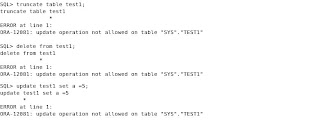 Any attempt to modify the “TEST1” table results in ORA-12081 error.
You can find out whether a table is in read-only mode by querying “READ_ONLY” column of “USER_TABLES” view. A value of “YES” indicates that a table is read-only while a value of “NO” indicates a table is in read-write mode.
Any attempt to modify the “TEST1” table results in ORA-12081 error.
You can find out whether a table is in read-only mode by querying “READ_ONLY” column of “USER_TABLES” view. A value of “YES” indicates that a table is read-only while a value of “NO” indicates a table is in read-write mode.
 At any time, you may place the table back in read-write mode using ALTER TABLE…READ WRITE statement.
 Read Oracle Database 11g Administrators Guide, for a complete list of allowed and barred operations on read-only tables.
 Using the ALTER TABLE …READ ONLY statement, I place “TEST1” table in read-only mode:
 Once a table is marked as read-only, all DML transactions are protected against that table.
 Any attempt to modify the “TEST1” table results in ORA-12081 error.
You can find out whether a table is in read-only mode by querying “READ_ONLY” column of “USER_TABLES” view. A value of “YES” indicates that a table is read-only while a value of “NO” indicates a table is in read-write mode.
Any attempt to modify the “TEST1” table results in ORA-12081 error.
You can find out whether a table is in read-only mode by querying “READ_ONLY” column of “USER_TABLES” view. A value of “YES” indicates that a table is read-only while a value of “NO” indicates a table is in read-write mode.
 At any time, you may place the table back in read-write mode using ALTER TABLE…READ WRITE statement.
 Read Oracle Database 11g Administrators Guide, for a complete list of allowed and barred operations on read-only tables.
Subscribe to:
Posts (Atom)